


Introduction
Small teams in India rarely fail because they lack talent. They fail because work lives in too many places: tasks in WhatsApp groups, deadlines in a Google Sheet, client feedback in email, and progress in someone’s memory. When one person is on leave, or a project grows from five tasks to fifty, that scattered system breaks.
A project management tool fixes this by giving every task an owner, a due date, and a status, in one place the whole team can see. The challenge is not finding a tool, there are dozens, but choosing one your team will actually use after the first enthusiastic week.
This guide compares the best project management tools for Indian small teams in 2026, with a focus on what matters locally: rupee pricing, GST billing, free plan limits, mobile use, and support that responds in Indian working hours. It goes beyond feature lists by giving you a decision framework, honest trade offs, and a trial method that prevents the common mistake of choosing the most powerful tool instead of the most usable one.

What a Small Team Actually Needs
Before comparing tools, define what “small team” means for you. A five person agency, a twelve person software team, and a twenty person service business need different things, even though all are called small.
Most Indian small teams need these basics, and little else at the start:
- Tasks with owners, due dates, and clear statuses, so nothing depends on memory.
- A board or list view that shows what is in progress, what is blocked, and what is due this week.
- File and comment threads attached to tasks, so feedback does not get lost in WhatsApp.
- A calendar or timeline view for deadlines and client deliverables.
- Mobile access that works well, since many team members check tasks on a phone.
- Simple reporting: who is overloaded, which projects are late, and what was completed this week.
Advanced features such as portfolio dashboards, resource forecasting, and complex automations are useful later, but they should not decide your first purchase. A tool that is powerful but confusing will be abandoned, while a simple tool that everyone opens daily will improve delivery immediately.
Also consider your existing stack. If you already use Zoho CRM, Books, or Mail, Zoho Projects integrates naturally. If you live in Google Workspace, a tool with strong Google Drive and Calendar integration will save daily friction. If your clients use Slack or Microsoft Teams, check notification and integration support before you commit.
How to Choose: A Simple Decision Framework
Use these five questions, in order, to narrow the list quickly.
- Team size and growth: Will this tool still work at double your current team size, without a painful migration?
- Work style: Do you work in simple task lists, Kanban boards, sprints, or client projects with timelines? Choose a tool whose default view matches your work, not one you must heavily customise to use.
- Budget in rupees: What is the total monthly cost, including GST, for your actual team size, not just the advertised per user price? Dollar priced tools fluctuate with exchange rates and may add payment friction.
- Adoption risk: Can a new team member understand the tool in one day, without training? If not, adoption will be your ongoing cost.
- Data and support: Is there an Indian data centre or local support option where relevant, and can you export your data if you leave? Data portability matters more than most teams realise until they need it.
Score each shortlisted tool on these five questions, not on total feature count. The winner is usually the tool with the highest adoption score at an acceptable price, not the tool with the longest feature page.
For a broader view of how automation and tools fit small business operations, see our guide to AI automation tools that help businesses save time.
The Best Tools Compared
Zoho Projects: Best value for Indian small businesses
Zoho Projects is often the strongest fit for Indian MSMEs, and for good reason. It offers rupee pricing, GST compliant billing, local support, and tight integration with Zoho CRM, Books, Mail, and other Zoho apps that many Indian businesses already use.
Strengths: affordable paid plans, Kanban and Gantt views, time tracking, task dependencies, and document integration. The free plan supports up to three users and two projects, which suits a very small team testing the system.
Trade offs: the interface feels less polished than Asana or monday.com, and some advanced reporting requires higher tiers. Teams outside the Zoho ecosystem may not gain the full integration benefit.
Best for: Indian agencies, consultancies, IT companies, and service businesses that want low rupee cost, GST ready billing, and a tool that grows with the Zoho stack.
Asana: Best for clean, structured teamwork
Asana is the polished, structured choice for teams that want clarity without clutter. It organises work into projects, tasks, and subtasks, with a calm interface that many teams find easier to keep tidy than more maximalist tools.
Strengths: excellent task structure, Timeline and Board views, strong templates, good mobile app, and reliable integrations with Google Workspace, Slack, and Microsoft Teams.
Trade offs: pricing is dollar based, which means the rupee cost moves with exchange rates, and advanced features such as portfolios and workload management sit on higher plans. Very small teams may find the free plan sufficient, but growing teams should budget for paid tiers early.
Best for: marketing teams, agencies, startups, and professional services that value a clean interface and structured workflows.
Trello: Best for simple, visual work
Trello is the easiest tool on this list to understand. Work is organised as cards on boards, moved from To Do to Doing to Done. For simple projects, that simplicity is a strength, not a limitation.
Strengths: almost no learning curve, generous free plan for basic use, Power Ups for integrations, and a mobile app that works well for field and service teams.
Trade offs: Trello struggles with complex projects, dependencies, and reporting. A team that outgrows simple boards will need to add Power Ups or migrate, which adds cost and complexity over time.
Best for: very small teams, freelancers scaling into a team, and service businesses managing straightforward, repeatable workflows.
ClickUp: Best all in one value for growing teams
ClickUp aims to replace several tools at once, combining tasks, docs, goals, time tracking, and dashboards in one workspace. For teams that want extensive customisation and do not mind a learning curve, it offers remarkable value.
Strengths: highly customisable views, docs and whiteboards included, generous free tier, and competitive paid pricing compared with Asana and monday.com.
Trade offs: the sheer number of features can overwhelm new users. Teams need a clear setup and a short onboarding guide, or they will use only a fraction of what they pay for. Performance can also feel heavy on older devices if workspaces are over customised.
Best for: growing teams that want one workspace for tasks, docs, and reporting, and are willing to invest a day in proper setup.
monday.com: Best for visual workflows and dashboards
monday.com shines when visual boards and dashboards are central to how a team works. Its colourful, flexible boards make status, ownership, and deadlines visible at a glance, which suits client facing teams and managers who report progress weekly.
Strengths: highly visual boards, strong automations, good dashboards, and a wide template library for agencies, marketing, and operations.
Trade offs: pricing is dollar based and can rise quickly as team size and features grow. The free plan is limited to two seats, so most real teams will need a paid plan early. Some teams also find the flexibility leads to inconsistent board structures unless a template is enforced.
Best for: growing teams, agencies, and operations leads who want visual tracking and management dashboards.
Notion: Best for projects plus documentation
Notion combines project tracking with documentation, wikis, and notes in one flexible workspace. For teams where knowledge management matters as much as task tracking, this combination is powerful.
Strengths: flexible pages, databases, templates, and docs in one place, with a generous free plan for small teams.
Trade offs: Notion is not a dedicated project management tool first. Advanced project features such as dependencies, workload views, and time tracking require workarounds or integrations. Teams with strict delivery workflows may find Asana or Zoho Projects more disciplined.
Best for: documentation heavy teams, startups, and content or product teams that want projects and knowledge in the same workspace.
For teams comparing this choice with wider software decisions, our CRM guide for Indian SMEs covers a similar rupee pricing and integration logic for customer management.
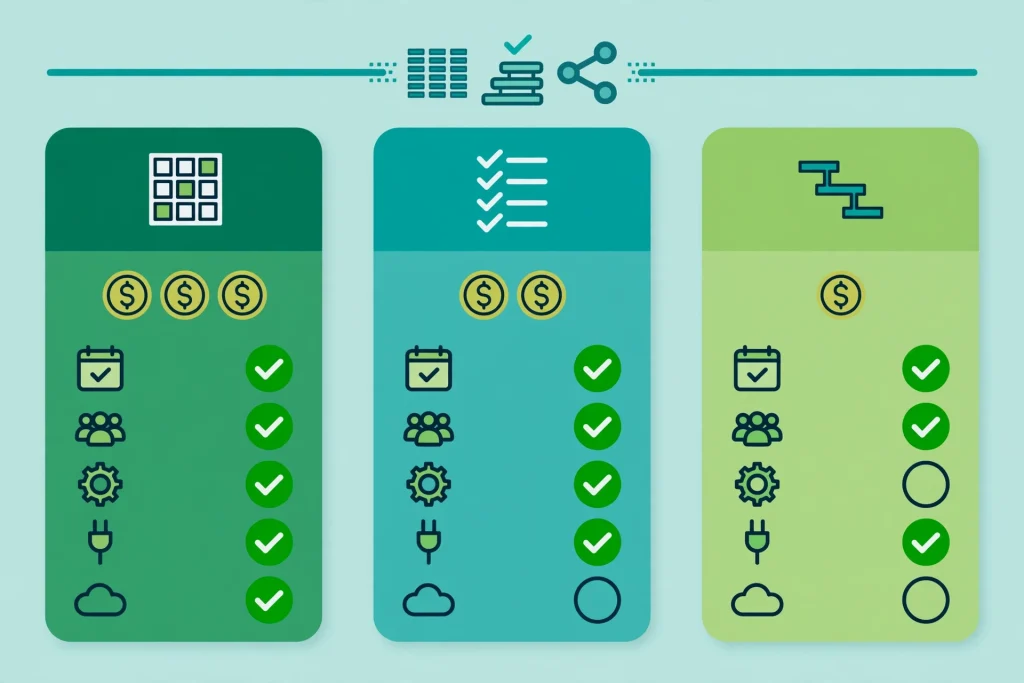
Quick Comparison Table
Use this table as a starting point, then verify current pricing on each provider’s official page before buying, since plans and limits change.
- Zoho Projects: best for Indian SMB value, free for up to 3 users, rupee pricing with GST billing, strong Zoho integration.
- Asana: best for clean structure, free plan available, dollar pricing, excellent templates and Timeline view.
- Trello: best for simplicity, free plan generous for basic boards, visual Kanban, limited advanced reporting.
- ClickUp: best all in one value, free tier generous, highly customisable, needs disciplined setup.
- monday.com: best for visual dashboards, free plan limited to 2 seats, dollar pricing, strong automations.
- Notion: best for projects plus docs, free plan generous, flexible databases, weaker native project controls.
No tool wins on every row. The right choice is the one your team will open every day, at a price you can sustain for a year, not just for a trial month.
Pricing, GST and Hidden Costs to Check in India
Advertised per user prices rarely tell the full story for Indian buyers. Check these items before you commit:
- Currency and tax: Is billing in rupees with GST invoice support, or in dollars with conversion fees and no GST input credit benefit? For many Indian SMEs, rupee billing alone can tip the decision.
- Minimum seats and billing period: Some tools charge annually by default, or require a minimum number of seats. A monthly option, even at a slightly higher rate, is safer for a first year test.
- Guest and client access: Can clients view project progress without a paid seat? If not, client collaboration costs more than the headline price suggests.
- Storage, automation, and reporting limits: Free and basic plans often limit automation runs, storage, or dashboard features that become essential as you grow.
- Migration and export: Can you export tasks, files, and comments in a usable format? A tool that locks your history in is expensive to leave, even if entry is cheap.
A practical budgeting rule: calculate total cost for your team size over 12 months, including GST and any paid add ons, and compare that figure, not the per user monthly teaser rate.
A Trial Method That Prevents a Bad Choice
Do not choose from a feature page alone. Run a two week trial with real work, using this method:
Week 1: Pick your top two tools, not five. Set up one real project in each, with the same tasks, owners, and deadlines. Use the tool daily, on mobile and desktop, and note every moment of confusion.
Week 2: Ask the team three questions: Which tool did you open without being reminded? Which tool made it obvious what to do today? Which tool would you still use if no manager checked? The answers predict adoption better than any demo.
Also test the exit: export the trial project, and check how complete the export is. Test support once, with a real question during Indian working hours, and note response time and clarity.
At the end of two weeks, choose the tool with the highest daily use and the lowest confusion, even if the other tool has more features. A tool nobody opens is the most expensive tool of all.
Common Mistakes Small Teams Make
- Choosing the most powerful tool, then using only 10 percent of it, while the team struggles with complexity.
- Letting every team member create their own board structure, so no two projects look alike and reporting becomes impossible.
- Tracking everything, including trivial tasks, which buries important deadlines under noise. Track deliverables and decisions, not every micro step.
- Ignoring mobile experience, even though field staff, sales teams, and founders often work from a phone.
- Skipping onboarding. A 30 minute team session, a one page guide, and a template project prevent weeks of inconsistent use.
- Never reviewing the system. Hold a monthly 20 minute review: archive finished projects, fix overloaded owners, and delete boards nobody uses.
Cloud reliability also matters for distributed Indian teams. Our cloud computing guide for Indian SMEs explains how to judge providers on uptime, data location, and support, criteria that apply equally to project tools.
FAQ
What is the best project management tool for a small Indian team on a budget?
Zoho Projects is usually the best budget choice for Indian teams, thanks to rupee pricing, GST billing, and local support. Trello and ClickUp free plans are also strong starting points for very small teams, but check their limits as you grow.
Is Asana or Zoho Projects better for Indian businesses?
Asana wins on polish and structured templates, while Zoho Projects wins on India specific value: rupee pricing, GST invoices, local support, and Zoho ecosystem integration. If you already use Zoho apps, Zoho Projects is usually the simpler choice. If you prioritise interface polish and use Google Workspace or Slack heavily, Asana is worth the dollar pricing.
Do I need a paid plan, or is a free plan enough?
A free plan is enough to test a tool and to run a very small team with simple projects. Once you need more than a handful of projects, advanced reporting, time tracking, or guest access, a paid plan usually becomes necessary. Start free, prove daily use, then upgrade deliberately.
How do I migrate from WhatsApp and spreadsheets to a project tool?
Start with one active project, not your entire history. Import its tasks, owners, and deadlines, set up a simple board, and run that project in the tool for two weeks while keeping old channels for urgent messages only. Once the team trusts the new system for one project, migrate the next, rather than moving everything at once.
Should a small team use separate tools for tasks, docs, and time tracking?
Only if each tool is genuinely best for its job and the team can maintain them all. Most small teams do better with one main workspace, such as ClickUp or Notion for tasks plus docs, or Zoho Projects with its integrations, rather than stitching together four separate apps that nobody fully maintains.
What about data security and Indian data centres?
Check where data is stored, whether the provider offers an Indian data centre or region, and what export options exist. For regulated or client sensitive work, data location and export rights should be part of the decision, not an afterthought discovered during an audit.
Conclusion
The best project management tool for your Indian small team is not the one with the most features. It is the one your team will open every morning, that fits your budget in rupees over a full year, and that makes ownership and deadlines obvious without training.
Shortlist two tools using the framework in this guide, run a real two week trial, and choose based on daily use, not demo polish. Zoho Projects will suit many Indian SMEs on value and local fit. Asana will suit teams that prize clean structure. Trello, ClickUp, monday.com, and Notion each suit a different work style, and the comparison table above should help you narrow quickly.
Start with one real project this week. Give every task an owner and a due date, and watch how much calmer delivery feels when work stops living in chat threads and spreadsheets.
