

Introduction
Google has a new flagship in its Gemini family, and Indian users are asking the same question they ask every time a major AI model launches: is this one actually useful for my work? Gemini 4 Neon is Google’s newest Gemini model, and it arrived in November 2026 with a clear pitch. It is built for speed, it handles very long documents, and it lets you control how hard the model thinks. Prices here are reported figures from tech press coverage in November 2026, so verify the current price at checkout.
What Is Gemini 4 Neon?
Gemini 4 Neon is the newest model in Google’s Gemini 4 series, positioned as the fast, capable, everyday flagship. It balances speed, reasoning and breadth, answering quick questions in seconds and working through complex problems when asked to think longer. It supports text, images, audio, video and code, so you can upload a photo, a PDF contract, or a spreadsheet and ask questions in plain English or Hindi.
How Neon Differs From Gemini 4 Hydrogen and Carbon
Each Gemini 4 model is a different trade off between speed, depth and cost. Readers who want the full picture of the previous flagship should look at our guide to Gemini 4 Hydrogen in India, which explains the model Neon follows. Hydrogen was the heavyweight thinker for the hardest reasoning and coding problems, where accuracy matters more than speed. Carbon was the efficient middle model, fast and affordable for everyday tasks. Neon aims to combine most of Hydrogen’s capability with speed better than Carbon’s, and adds four thinking levels, so you can decide how much reasoning effort the model spends on each task.

Key Features of Gemini 4 Neon
- 1 million token context window: load long documents and large codebases without losing track.
- Four thinking levels: Low, Medium, High and Extra High, so you can trade speed for depth task by task.
- Multimodal input: text, images, audio, video and code in one conversation.
- Fast responses: Google claims about 3 times the speed of Gemini 4 Carbon.
- Strong coding support: code generation, debugging and refactoring across Python, JavaScript and Java.
- Google Workspace integration: works with Gmail, Docs, Sheets and Drive.
- Indian language support: understands Hindi, Hinglish, Tamil, Telugu, Bengali and Marathi.
- Search grounding: pulls in current information from the web.
Thinking Levels Explained: When to Use Low vs Extra High
Thinking levels are Neon’s most practical feature, and the easiest to misuse. The level controls how long the model reasons before answering. Higher levels cost more time and consume your allowance faster, so pick the lowest level that gives a reliable answer. Low is for quick, low risk tasks: rewriting a sentence, summarising a short email, or translating a message. Medium is the default for most daily work: drafting a blog post, writing a client proposal, or planning a campaign. High is for work where mistakes are costly: debugging tricky code, analysing a contract, or checking a tax document. Extra High is for the hardest problems: complex research or software architecture decisions. It is slower and counts more heavily against usage limits. A simple rule: if the answer is easy to check and cheap to fix, use Low or Medium. If it is hard to check and expensive to fix, use High or Extra High.
How to Access Gemini 4 Neon in India
The Gemini app is the easiest route. Open the app on Android or iOS, or visit gemini.google.com, sign in, tap the model picker at the top, and select Gemini 4 Neon. If you do not see it, update the app and check your plan is eligible, since Neon is on paid AI plans and free users may see a limited version or none at all.
Google AI Studio is Google’s free playground for testing models, popular with Indian developers and students. Visit aistudio.google.com, sign in, create a prompt, and choose Gemini 4 Neon from the model dropdown. It is the best place to compare Neon with Hydrogen and Carbon on your own tasks before you pay.
The Gemini API is for developers building Neon into an app, website or internal tool. Create a project in Google AI Studio or Google Cloud, generate an API key, and call the model with Google’s client libraries. Reported API pricing is around $3 per 1 million input tokens and $15 per 1 million output tokens. Keep your API key private and set usage limits. If Neon does not appear in your picker, the usual causes are an outdated app, a free plan, or a staged rollout. There is no need to use a VPN.
Hands-On Use Cases for Indian Users
Coding and debugging. Developers can paste an error message and the relevant code, and ask Neon to explain the bug, suggest a fix, and explain why it works. On High thinking, it spots off by one errors, missing null checks, and API misuse.
Spreadsheets and data work. Upload a CSV or Google Sheet and ask questions in plain language: which products sold best last quarter, or which campaigns had the lowest cost per lead. Always double check numbers that go into a client report or a tax filing.
GST and accounting work. Neon can explain a GST notification in plain language, draft a client reply about GST on an invoice, or summarise a long circular. It is not a chartered accountant, so get a CA to confirm anything that affects money owed.
Research and learning. Students preparing for UPSC, CA, or engineering exams can ask Neon to explain a topic, quiz them, and summarise a chapter. Researchers can load several papers and ask for points of agreement and disagreement, all at once thanks to the 1 million token window.
Content drafting. Writers and small business owners can use Neon to draft blog posts, captions, product descriptions and newsletters. For a practical workflow, see our guide on how to use Google Gemini for content writing in India, which covers prompts, editing and fact checking. The draft is only the start: edit for your brand voice and check every fact.
Indian language work. Neon can draft a WhatsApp message in Hindi, translate a product page into Tamil, or write a customer reply in Hinglish. Indian language models, including the work covered in our guide to Sarvam AI in India, are also worth comparing if your work is mostly in one Indian language. Check the output carefully, because polite forms and local idioms still trip up general models.
India Pricing and Value Verdict: Neon vs ChatGPT and Claude
Google’s AI plans in India are reported at around Rs 399 per month for AI Plus, around Rs 1,950 per month for AI Pro, and Ultra from around Rs 6,500 per month. AI Pro is the plan most professionals will consider. Verify the current price and plan contents at checkout.
The comparison that matters most is AI Pro at around Rs 1,950 per month against its rivals. ChatGPT Plus is priced at a similar level, and Claude Pro is in the same broad band. The difference is what else you get: ChatGPT Plus suits users who live inside OpenAI’s tools and voice mode, while Claude Pro suits long, careful writing and detailed document analysis.
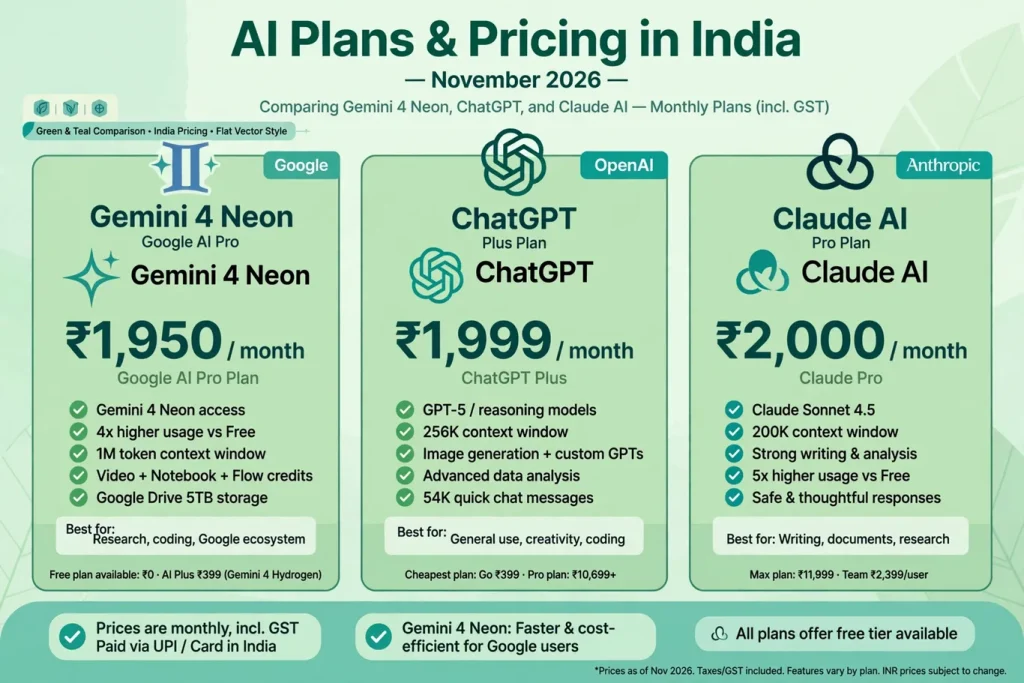
Gemini 4 Neon on AI Pro wins on three counts. First, it is bundled with Google’s ecosystem: if your work lives in Gmail, Docs, Sheets and Drive, Neon can reach into those tools in a way rivals cannot match. Second, it is fast, and users who ask dozens of questions a day feel the difference every hour. Third, Google often bundles storage and other benefits with its AI plans in India. The honest verdict: if you are already a Google Workspace user, AI Pro with Neon is the best value of the three at around Rs 1,950 per month. If you write long form content or code all day and rarely use Google tools, try Claude Pro. If you want the broadest third party integrations, try ChatGPT Plus. For developers, API pricing of around $3 per 1 million input tokens and $15 per 1 million output tokens puts Neon in the premium range: competitive where speed and quality matter, and expensive for bulk, low value tasks.
Honest Limitations and Downsides
- Usage caps still apply. Even on paid plans, there are limits on prompts, especially at High and Extra High thinking, and heavy users can hit a cap midday.
- It can still hallucinate. Neon can invent a fact, price, citation or legal clause with complete confidence. Verify anything that goes to a client, a court, or a tax filing.
- It is not the best at everything. On some coding and writing tasks, Claude Opus 5.5 may still be more careful, and on some creative tasks GPT-6.2 Sol may be more original. Google’s benchmark claims are its own tests.
- Indian language nuance is imperfect. Neon handles Hindi and other Indian languages well for everyday use, but it can miss polite forms, regional idioms, and code switching.
- Privacy needs care. Check your data settings before uploading client data, financial records, or personal information.
- The ecosystem lock in is real. Neon’s best features depend on Google tools, so Microsoft 365 teams will get less value from the same subscription.
None of this makes Neon a bad product, only one to use with judgement. It will not replace a CA, a lawyer, or a senior developer, but it will make those professionals faster, and let a small business do work that once needed a bigger team.
Who Should Upgrade to Gemini 4 Neon?
Upgrade to AI Pro for Neon if you ask an AI tool questions all day, work inside Google Workspace, handle long documents, write code, or need fast answers during live work. Consider Ultra only if you hit Pro limits regularly or run a team that depends on the model for client work: at around Rs 6,500 per month, it should pay for itself in saved hours. Stay on a free plan, or on AI Plus at around Rs 399 per month, if you only use AI a few times a week. Students should try AI Studio and the free tier first.
FAQ
Is Gemini 4 Neon available in India?
Yes, through the Gemini app, the Gemini website, and Google AI Studio, on eligible paid plans. If you do not see it in the model picker, update the app and check your subscription, since rollouts are staged. Free users may have limited or no access.
How much does Gemini 4 Neon cost in India?
There is no separate price for Neon alone. It is included in Google’s AI plans, reported at around Rs 399 per month for AI Plus, around Rs 1,950 per month for AI Pro, and Ultra from around Rs 6,500 per month. API access is reported at around $3 per 1 million input tokens and $15 per 1 million output tokens. Verify the price at checkout.
What is the difference between Gemini 4 Neon, Hydrogen and Carbon?
Hydrogen is the deep reasoning model for the hardest problems, Carbon is the efficient everyday model, and Neon is the new fast flagship combining most of Hydrogen’s capability with speed better than Carbon’s. Neon also adds four thinking levels for control over reasoning effort.
What are the four thinking levels in Gemini 4 Neon?
The four levels are Low, Medium, High and Extra High. Low is for quick tasks like rewrites and short summaries. Medium is the default for daily work like drafting and planning. High is for work where mistakes are costly, such as debugging, contracts and tax documents. Extra High is for the hardest research problems, and should be used sparingly because it is slower and consumes more allowance.
Is Gemini 4 Neon better than ChatGPT and Claude?
Google claims Neon beats Claude Opus 5.5 and GPT-6.2 Sol on its own benchmarks, but the honest answer depends on your work. Neon is faster and integrates best with Google Workspace. Claude may still be better for careful long writing and some coding, and ChatGPT may still be better for voice use and third party integrations.
Can I use Gemini 4 Neon for GST and accounting work in India?
Yes, for explaining GST rules, summarising circulars, drafting client messages, and preparing filing checklists. It is useful for preparation, but it is not a chartered accountant. Tax rules change, and the model can be out of date, so always get a CA to confirm anything that affects money owed or a filing deadline.
Conclusion
Gemini 4 Neon is a strong, fast, practical model, and for many Indian users it is the first Gemini model that feels like a genuine daily workhorse. The 1 million token context window, the four thinking levels, and the speed advantage over Carbon make it useful for real tasks, from debugging code to GST preparation to research. Pricing is fair against ChatGPT Plus and Claude Pro, and best value for Google Workspace users. Judge Neon by a week of your own work, not its benchmark claims: use Medium thinking as your default, save High and Extra High for work where mistakes cost money, and keep a human in charge of facts, money and client commitments.
