

Introduction
WordPress powers a huge share of Indian business websites, from small clinics and coaching centres to manufacturers and online stores. That popularity also makes it the most targeted platform for automated attacks. Every day, bots try common passwords, probe outdated plugins, and scan for known vulnerabilities on Indian sites.
Most successful attacks do not use sophisticated hacking. They use weak passwords, outdated software, abandoned plugins, and missing backups. That is good news, because those problems are fixable with a straightforward checklist, even for a business without a dedicated IT team.
This WordPress security checklist is written for Indian websites: it covers the essentials in priority order, explains Indian-specific risks such as the Digital Personal Data Protection Act, and ends with a recovery plan for the day something goes wrong, because preparation, not panic, is what saves a hacked site.
Why WordPress Sites in India Are Targeted
Attackers do not choose targets manually. Automated bots scan millions of sites, looking for the easiest entry point. A site with the default “admin” username, a weak password, and a plugin that has not been updated in two years is an easy target, regardless of its size or industry.
Indian small businesses face a few extra risks. Many sites are built once and then left alone, with no one responsible for updates. Shared hosting is common, so a vulnerability on one site can sometimes affect neighbours if isolation is weak. Customer data, including phone numbers, addresses and payment-related details, is increasingly valuable, and a breach can now carry regulatory consequences under India’s DPDP Act, as well as reputational damage and lost search traffic if Google flags the site as unsafe.
Security is therefore not a one-time project. It is a routine, like accounting or stock-taking, that protects revenue, rankings and trust.
Priority 1: Accounts, Passwords and Login Protection
Start with accounts, because stolen logins are the most common way into a WordPress site.
- Remove the “admin” username if it still exists, and create a new administrator account with a unique name. Delete or demote old accounts belonging to former staff or agencies.
- Use a strong, unique password for every account, stored in a password manager. Never reuse the password you use for email or banking.
- Enable two-factor authentication for all administrator accounts, using an authenticator app rather than SMS where possible.
- Limit login attempts, so a bot cannot try thousands of passwords. A security plugin or your hosting firewall can enforce this.
- Change the login URL only as an extra layer, not as a replacement for strong passwords. Security through obscurity alone does not stop a determined attacker.
Review user accounts quarterly. A surprising number of hacked sites still have an active account for a freelancer who finished work two years ago.
Priority 2: Keep Core, Themes and Plugins Updated
Outdated software is the second most common entry point. When a vulnerability in a popular plugin is disclosed, bots start exploiting it within hours, sometimes before site owners have even heard about it.
- Enable automatic updates for WordPress core minor releases, and update major releases promptly after a backup.
- Update themes and plugins weekly, and remove any theme or plugin you no longer use. An inactive plugin can still be exploited if its files remain on the server.
- Before a major update, take a backup and test on a staging site if your business depends on the site for sales or bookings.
- Avoid nulled or pirated themes and plugins. They often contain hidden malware, and they receive no security updates.
- Check that your plugins are still maintained. A plugin not updated in over a year, with no recent support activity, should be replaced with a maintained alternative.
If updates feel risky, that is a sign your backup and staging process needs fixing, not a reason to stay on old, vulnerable software.
Priority 3: Backups You Have Actually Tested
A backup you have never restored is a hope, not a plan. Many businesses discover too late that their backups were incomplete, corrupted, or stored on the same server that was compromised.
Follow this backup routine:
- Take automated daily backups for active sites, and weekly backups as a minimum for brochure sites.
- Store at least one copy off the server, such as in cloud storage or with a separate backup service.
- Keep several restore points, not only the latest one, because malware may have been present for days before it was noticed.
- Test a restore at least twice a year, on a staging site, and record how long it takes and what steps are involved.
- Make sure the backup includes both files and the database. A files-only backup cannot restore your content, and a database-only backup cannot restore your theme and uploads.
A tested backup turns a hacking incident from a disaster into a bad day. Without one, the same incident can mean rebuilding the site from scratch.
Priority 4: Harden WordPress Settings
Hardening means changing default settings that make WordPress easier to attack. These steps take minutes and close common doors:
- Disable the dashboard file editor, so a compromised administrator account cannot directly edit theme and plugin code. Add the setting in wp-config.php or use a security plugin.
- Protect wp-config.php and .htaccess from web access, and set sensible file permissions, typically 640 or 600 for wp-config.php.
- Disable directory listing, so attackers cannot browse your uploads and plugin folders.
- Disable PHP execution in the uploads folder, so a malicious file uploaded through a vulnerability cannot run.
- Force HTTPS across the whole site, and check that your SSL certificate is valid and auto-renewing.
- Add security headers, such as X-Frame-Options and Content-Security-Policy, carefully and after testing, to reduce clickjacking and script injection risks.
- Disable XML-RPC if you do not use Jetpack or a mobile app that needs it. If you need it, protect it with login limits and monitoring.
Do not install multiple security plugins that do the same job. Choose one well-maintained plugin, such as Wordfence or Solid Security, configure it properly, and enable email alerts for new administrators, changed files, and failed login spikes.
Priority 5: Choose Secure Indian Hosting
Your hosting provider is part of your security. Even a perfectly configured WordPress site can be undermined by weak server security.
When evaluating Indian hosting, look for: account isolation on shared plans, a web application firewall, malware scanning and removal, daily backups, PHP version support for current releases, and support that responds quickly to security incidents. Many Indian hosts now include Imunify360 or a similar firewall and malware system by default. Ask your host what is included, and what is your responsibility, because the division is often unclear until something goes wrong.
Managed WordPress hosting is worth considering for businesses without technical staff. It typically handles server updates, caching, backups and some security monitoring, leaving you responsible mainly for content, accounts and plugin choices. Compare the total cost, including the time you save, not only the monthly hosting price.
Priority 6: Forms, Uploads and E-commerce Data
Forms and file uploads are common attack surfaces, especially on Indian business sites that accept job applications, quotations, or customer documents.
- Use a reputable form plugin, keep it updated, and add spam protection such as a CAPTCHA or honeypot field.
- Restrict upload file types to what you actually need, such as PDF and common image formats, and never allow executable files.
- For e-commerce, never store card details on your own server. Use a PCI-compliant payment gateway, keep customer data to the minimum you need, and review who can access order data.
- Under the DPDP Act, collect only the personal data you need, explain why you need it, protect it, and delete it when it is no longer required. A privacy policy that matches your actual practice is part of security, not just legal paperwork.
- Review third-party scripts, such as chat widgets, analytics and ad tags, because a compromised third-party script can affect your site even if WordPress itself is secure.
The Monthly WordPress Security Routine
Security works when it becomes a habit. Put this routine on a calendar, and assign it to a named person:
Monthly:
- Update core, themes and plugins, after a backup.
- Review administrator accounts and remove unused ones.
- Check security plugin alerts and failed login reports.
- Verify that the latest backup completed and is stored off-server.
- Check SSL validity and site speed, because a sudden slowdown can signal malware.
Quarterly:
- Audit installed plugins and remove anything unused or unmaintained.
- Review file permissions and security headers.
- Test a backup restore on staging.
- Review privacy and data collection practices against the DPDP Act.
Annually:
- Change administrator passwords and review two-factor authentication.
- Review hosting plan and firewall settings.
- Run a full malware scan and a vulnerability review with your host or a security professional.
This routine pairs well with a broader maintenance plan. Our website maintenance plan guide for Indian businesses covers performance, content and backup tasks alongside security, and our WordPress speed guide explains how security and speed work together.
What to Do If Your Site Is Hacked
If your site is hacked, do not panic, and do not simply delete the suspicious files and hope for the best. Follow a clear sequence:
- Take the site offline or put it in maintenance mode if it is spreading malware or phishing pages.
- Change all administrator, hosting, database and email passwords from a clean device.
- Contact your hosting provider and ask for a malware scan, logs, and help identifying the entry point.
- Restore from a clean backup taken before the infection, if you have one, then update everything immediately.
- If no clean backup exists, use a security professional or a reputable malware removal service to clean the files and database, and check for hidden administrator accounts and scheduled tasks.
- After cleaning, force password resets for users, review Google Search Console for security warnings, and request a review once the site is clean.
- Finally, fix the entry point. Restoring without fixing the vulnerability that let the attacker in will lead to a repeat infection, often within days.
Document what happened, what was fixed, and what will change in your routine. That record is valuable if customers, a payment provider, or a regulator asks what you did.
Common Mistakes to Avoid
The most common mistake is thinking a small site is not a target. Bots do not check your revenue before attacking. They check for vulnerabilities.
Other mistakes include: using the same password across sites, installing a security plugin but never reading its alerts, keeping ten inactive plugins “just in case,” never testing a backup, and ignoring update notifications for months. Each of these is easy to fix, and each fix closes a real door.
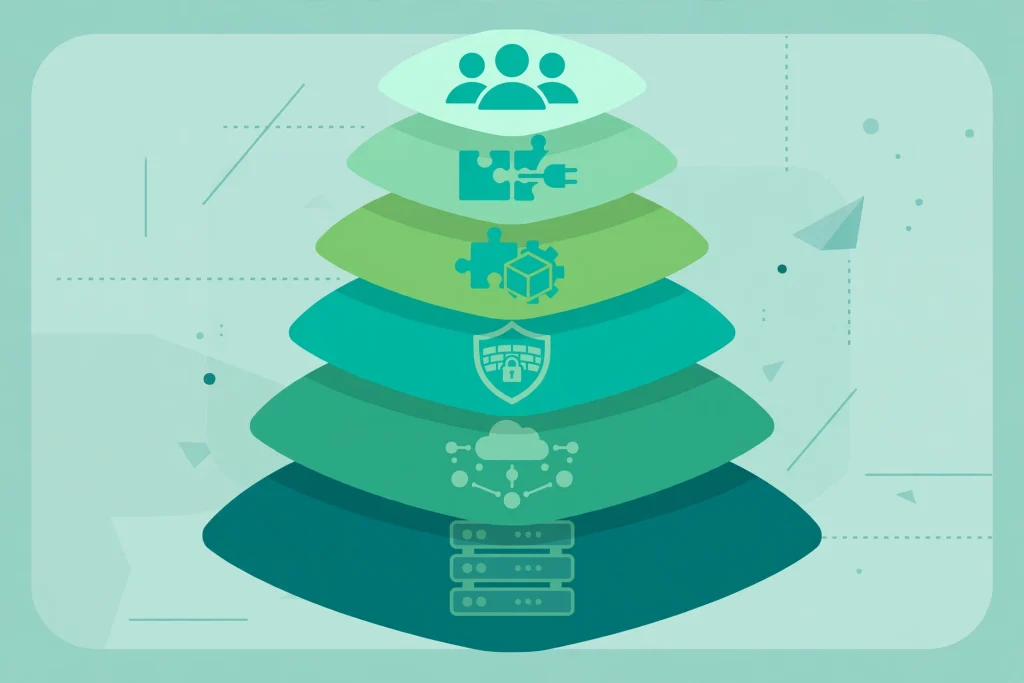
Also avoid security advice that promises complete protection from a single plugin or a single setting. WordPress security is layered: strong accounts, updated software, tested backups, hardened settings, secure hosting, and monitoring all matter together. No single layer is enough on its own.
For hosting choices that support this layered approach, see our comparison of web hosting in India for small businesses.
Frequently Asked Questions
Is WordPress secure for an Indian business website?
Yes, when it is maintained properly. WordPress itself is widely audited, but security depends on updates, strong accounts, a reputable host, and tested backups. A neglected WordPress site is insecure, just as a neglected shop with an unlocked door is insecure.
Which WordPress security plugin should I use?
Use one well-maintained plugin, such as Wordfence or Solid Security, rather than several overlapping plugins. Configure login limits, file change alerts and firewall rules, and actually read the alerts it sends. A plugin you ignore does not protect you.
How often should I update WordPress and plugins?
Check weekly, and update promptly, after a backup. Enable automatic updates for minor core releases, and do not leave a known-vulnerable plugin unpatched for weeks because an update feels inconvenient. Attackers exploit disclosed vulnerabilities quickly.
What should I do first if my WordPress site is hacked?
Take the site offline or into maintenance mode, change all passwords from a clean device, contact your host for a scan and logs, and restore from a clean backup if you have one. Then fix the entry point before bringing the site back, or the infection is likely to return.
Does the DPDP Act affect WordPress security?
Yes. If your site collects personal data, such as names, phone numbers, addresses or order details, the DPDP Act requires you to protect that data, collect only what you need, and handle breaches responsibly. Good WordPress security, including access control, updates and backups, is a core part of meeting that duty.
Conclusion
WordPress security for Indian websites is not about buying an expensive tool or hiring a specialist for a one-time fix. It is about a short, repeatable checklist: strong accounts with two-factor authentication, prompt updates, tested off-server backups, hardened settings, secure hosting, and a monthly routine that someone actually owns.
Work through the priorities in this guide in order, starting today with accounts and backups. Those two steps alone close the most common attack paths. Then build the monthly routine, so your site stays protected in 2026 and beyond, instead of becoming another easy target for automated bots.
